tap2work. Attendance on the site itself.
Verified workforce presence from fixed checkpoints. A tap at the checkpoint becomes a timestamped record tied to the place it happened, with patrols, flags and exports on top.
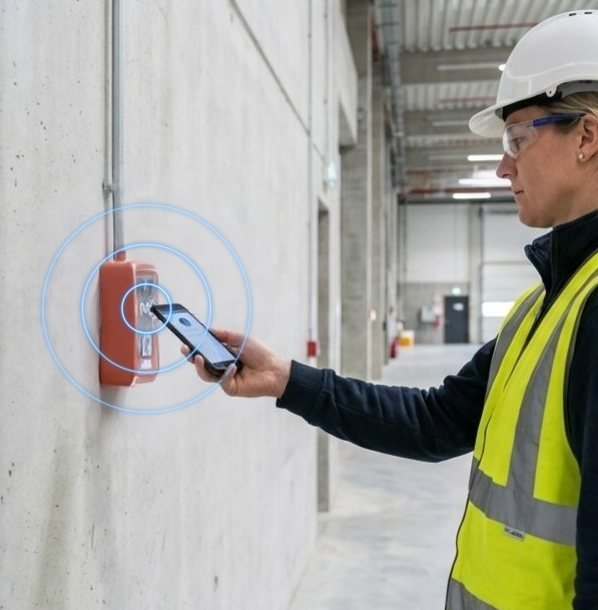
Where it lives, and what one tap does.
Where
Construction sites, contracting worksites and field operations.
The tap
A worker taps the site checkpoint on arrival and on departure.
The outcome
Timestamped attendance, tied to the checkpoint where it happened.
From the tag to the record, in four steps.
The blue step is the tap. The steps before it are set up once; the steps after it show what happens next, and who acts.
Set up
Sites, checkpoints, people and shifts are defined. Tags are encoded and fixed in place.
Tap
The worker taps the checkpoint on arrival. tap2 validates the tag, the project, the enrolment and the active session.
See
A live roster shows who is on site. Absences and missed departures are flagged on their own.
Report
Supervisors record overrides with a reason. Reports export for payroll, clients or audits.
What is available now, and what is on the roadmap.
Available now
- A tap validates tag, project, enrolment and the active session
- Live roster per site and per shift
- Overrides need a reason and are added on top of the original record
- Patrol routes with checkpoint sequences
- Absence and missed-departure flags
- Exports to CSV, Excel and PDF
- Arabic and English
On the roadmap
- Enterprise sign-on and HR integration, scoped per deployment
- Secure tag verification where the deployment requires it
- Dedicated environments per client
The tag, the people and the measures.
Hardware
A rugged checkpoint tag at the gate, the site office or along a patrol route.
Designed to support secure (NTAG 424 DNA) tags where a deployment requires them.
People and records
Workers and inspectors, supervisors, site managers and head office.
Arabic and English, with right-to-left layouts. Every tap is recorded with its time and place; overrides are added on top, never overwriting the original.
What a first deployment measures
- Arrivals recorded at the checkpoint against the roster
- Overrides per week and their reasons
- Patrol coverage per route
tap2work in the sectors it serves.

Government
Verified presence and accountable field operations, without pooling every agency’s data.
See the solution
Healthcare and hospitals
Evidence of presence and task completion where care is delivered, without new terminals.
See the solution
Municipalities
Municipal operational intelligence: every public asset becomes a point of service, reporting and response.
See the solution
Civil defence and emergency services
Put the help point’s location in the responder’s hands before the first call ends.
See the solution
Residential developments
One tagged estate for access, services, early warnings and emergencies.
See the solution
Higher education
Attendance that professors trust and registrars can defend, from the lecture-room door.
See the solution
 tap2visitGated entry points
 tap2attendClassroom roll call
 tap2shopRetail conversion
 tap2linkMenus and links
 tap2voteFan participation
 tap2alertEmergency reporting
 tap2sayService feedback
 tap2idDigital profiles

Put tap2work on the site checkpoint.
Start with one place and the measures agreed before the first tag goes up. Arrivals recorded at the checkpoint against the roster, for a start.